I have a db that I am updating to use PHPMaker from ASPMaker. I know I have all the right settings in the advanced permission table to allow for granular logon to the CMS (i double checked against another PHPMaker project, and the settings are identical).
Bur for some reason when I log in I am getting a 401 Error saying that don’t have permission. In the db in the column designated for the permissions has it set to the value -1 which should be correct.
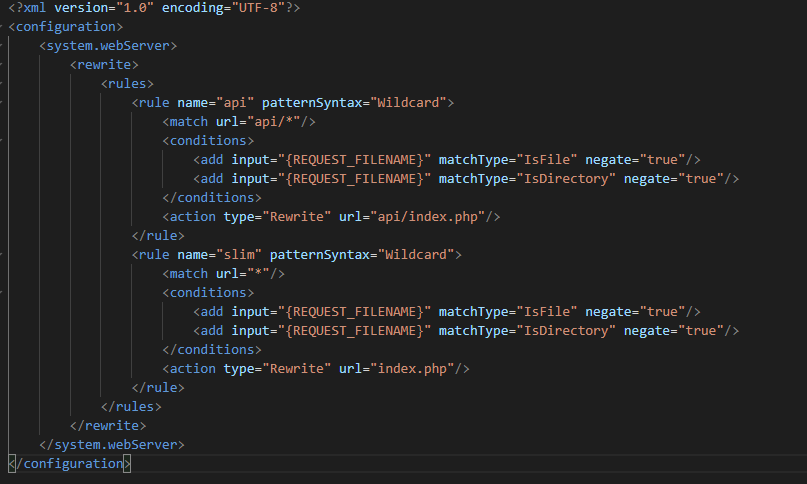
Make sure the URL Rewrite Module of IIS is installed and the web.config is properly set up.
If there is a web.config file in a parent folder, review its contents to ensure it does not block the subfolder. Note that settings in a parent web.config are inherited by child web.config files in subfolders.
You can also post the content of your web.config for discussion.
No, it is not the same as that in the docs. Your web.config is generated from an older version (< v2025). Which version are you using exactly? If older than v2025, you better upgrade.
If you use v2025, delete the web.config and generate again. Make sure you have not disabled the advanced setting Generate web.config. Also make sure you have deleted the physical “api” folder.
If you use User Level Security, double check your user level security settings. You mentioned -1, then make sure the Administrator User Level (with user level -1) exists in your User Level table, and make sure the logged in user belongs to the user level, i.e. the value of the User Level field of the user is -1.
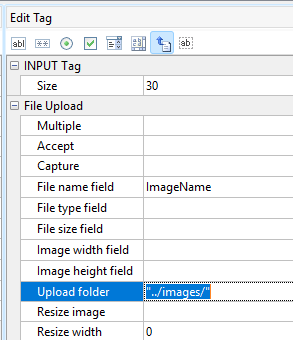
OK I upgraded to 2025 and that seemed to fix the problem. The only issue I have now is that my images aren’t found. I checked the application and the setting for the upload folder is “../images/” and that folder does exist (with images in them). is this not the right setting?
I tried to upload a new image and I got “failed to write to disk”. the IUSR has full rights on the images folder, is there something I need to do to the CMS folder?
Do not use “..”, you may read Upload path → Notes.
Note that IIS user is not always IUSR, you may also want to set up for your IIS application pool name (or IIS_IUSRS). If it still does not work, you may set up write permission for Everyone.
Using Apache is preferred for PHP, if you are not familiar, you may try WampServer.
thanks, I have used that same setting (e.g. “../folder/”) forever with previous versions of ASPMaker, .NETMaker, and even previous versions of PHPMaker. The reason is that I want the images saved in the root of the website, not in the cms folder. e.g.
/root folder/images
not
/root folder/cms/images/
Is that not an option anymore?
Changing to “/images/” did allow the upload to work, but the images are not where I want them now.
PHP works just fine in IIS, and our server has way too many websites on it to consider switching to Apache or any other webserver
Please explain what should I put in the upload folder to get the images to upload if the cms is in domain.com/cms and the images are in domain.com/images