Hi everyone,
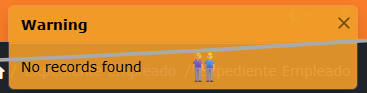
I’d like to this message will close after 5 sec, or the time that I set, because if you dont click the “x” close, it always show.
I want to make this in all the project, NO in one page.
Thanks.
Hi everyone,
I’d like to this message will close after 5 sec, or the time that I set, because if you dont click the “x” close, it always show.
I want to make this in all the project, NO in one page.
Thanks.
You may set ew.toastOptions.autohide = true by Page_Head server event.
It works only with the success, but the warning toast, still always show, and there is a way to set the time?
You may set ew.toastOptions.delay.
Warning and error messages should not auto-hide because they are crucial for communication between the system and the user, and auto-dismissal can lead to confusion, data loss, and frustration.
Persistent messages allow users to read, understand, and fix the issue at their own pace, rather than having to restart a process because the error message disappeared too quickly.
Here are the primary reasons why error/warning messages should not auto-hide:
Usability and Error Correction: When messages disappear (e.g., as "toasts" or alerts), users often don't get a chance to read them, making it impossible to fix the mistake. Persistence allows users to keep the error visible while they make corrections.
Accessibility Issues: Automatic dismissal is a major issue for users with disabilities or those using screen readers. People with visual impairments might need extra time to read the message, or it may not be in their focal area.
Reduced User Anxiety: Errors already cause stress. Making messages vanish and leaving the user with a broken flow causes anxiety and confusion, often leading them to abandon the task.
Preventing Further Errors: If a user misses the warning, they might repeat the same mistake, causing further frustration.
Context Loss: If an error appears (e.g., "invalid format") and then disappears, the user might forget which field caused the issue and why.
Best Practices for Error Visibility:
Make them sticky: Error messages should remain visible until the user resolves the issue or manually dismisses it.
Inline Messages: Place the error directly adjacent to the field or action that caused it.
Dismissible, not Auto-hiding: Allow users to close the alert themselves.