We have been using ASP.NET Maker 2020 and 2022 for years and are now building a new server to redeploy everything using ANM 2026. I started with a simple database, opened the 2022 project in 2026 and adjusted a few things until it worked. However, it only works with a trailing slash on the URL or a full document name:
http://<ServerName>/ASPNET/InternTasks/
http://<ServerName>/ASPNET/InternTasks/TasksList
This worked on the old server but not the new one:
http://<ServerName>/ASPNET/InternTasks
because it redirects to:
http://<ServerName>/ASPNET/TasksList
which causes a 404 not found because it removed the folder name "InternTasks".
Is there a new setting somewhere that didn't get populated when importing a 2022 project, or something new I need to set up? I have read all the "Migrating to v202x" and didn't notice anything related to this.
Is Login enabled? How did you go to http://<ServerName>/ASPNET/InternTasks? Type the url directly in the address bar of the browser?
Your server redirects to upper level. It seems that the base path (i.e. /ASPNET) of your application is wrong. Make sure you have a create ASP.NET application at the root folder of http://<ServerName>/ASPNET/InternTasks in IIS.
Windows authentication is enabled but nothing is checked on the Security tab of this project. With an allowed user logged onto Windows and one of the URLs that work, the list page appears with no login prompts. We tried changing it to Anonymous(IIS) and Cookie(ANM) authentication. There was very little custom code in the project so I removed it all just to make sure it was not causing this. We also created a new project in 2026 without using the 2022 project. None of those made a difference.
Yes, I typed the URLs directly in the address bar of the browser.
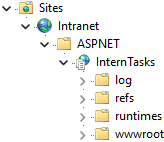
It did seem like the base path was somehow wrong, but it looks correct and is set exactly the same as what worked in 2022. We tried various other combinations just to make sure. Those either did not work at all or still redirect to the upper level, even the website root if we moved the application up one level. InternTasks is the ASP.NET application we created and points to the folder we published to. This is how it looks in IIS Manager:
We tried a number of things and noticed a difference between ANM 2022 and 2026 in the Index function that handles the routes. It seems like this may be related, either the different Route specifications or the Microsoft RedirectResult function and subsequent processing (IIS, browser) that might not determine the correct amount of the path to strip off and replace without some additional help.
2026:
// Index
[Route("/", Name = "index")]
[AllowAnonymous]
public async Task<IActionResult> Index()
{
    await Security.LoginAsync();
    string url = "TasksList";
    // If no default URL, find the first available table
    if (url == "") {
        var tableList = Config.UserLevelTables;
        for (var i = 0; i < tableList.Count; i++) {
            if (!Empty(tableList[i].Url)) {
                url = tableList[i].Url;
                break;
            }
        }
    }
    if (url == "") {
        return StatusCode(401, DeniedMessage());
    }
    return new RedirectResult(url, Config.RedirectPermanent);
}
2022:
// Index
[Route("")]
[Route("index", Name = "index")]
[Route("Home/index", Name = "index-2")]
[AllowAnonymous]
public async Task<IActionResult> Index()
{
    // Create page object
    index = new GLOBALS.Index(this);

    // Run the page
    return await index.Run();
}
Please also try latest template (Tools -> Update Template).
The new template fixed it. Thank you for your help!