PHPMaker v2026.6.
I found issue regarding code in CustomTemplateSearch in Calendar Reports will replace the same fields in CustomTemplateView.
You may reproduce the issue by following these steps:
-
Open demo2026 project uses PHPMaker v2026, then click on Calendar1 from Database pane,
-
From Fields setup, make sure you have already enabled Ext. Search option for both Title and Description fields,
-
Copy-paste this code into CustomTemplateSearch:
<div class="container row row-cols-auto" id="extended_search"> <div class="col-sm-12 col-md-12 col-lg-6"> <div id="r__Title"> <div class="row"> <div class="col-sm-12 col-form-data">{{{_Title}}}</div> </div> </div> </div> <div class="col-sm-12 col-md-12 col-lg-6"> <div id="r_Description"> <div class="row"> <div class="col-sm-12 col-form-data">{{{Description}}}</div> </div> </div> </div> </div> -
Copy-paste this code into CustomTemplateView
<div class="container-view" id="calendar-view"> <div class="row row-cols-1"> <div id="r__Title" class="col-sm-12 col-md-12 col-lg-12"> <div class="row"> <label for="x__Title" class="col-sm-4 col-form-label">{{{caption _Title}}}</label> <div class="col-sm-8 col-form-data">{{{value _Title}}}</div> </div> </div> <div id="r_Start" class="col-sm-12 col-md-12 col-lg-12"> <div class="row"> <label for="x_Start" class="col-sm-4 col-form-label">{{{caption Start}}}</label> <div class="col-sm-8 col-form-data">{{{value Start}}}</div> </div> </div> <div id="r_End" class="col-sm-12 col-md-12 col-lg-12"> <div class="row"> <label for="x_End" class="col-sm-4 col-form-label">{{{caption End}}}</label> <div class="col-sm-8 col-form-data">{{{value End}}}</div> </div> </div> <div id="r_AllDay" class="col-sm-12 col-md-12 col-lg-12"> <div class="row"> <label for="x_AllDay" class="col-sm-4 col-form-label">{{{caption AllDay}}}</label> <div class="col-sm-8 col-form-data">{{{value AllDay}}}</div> </div> </div> <div id="r_Description" class="col-sm-12 col-md-12 col-lg-12"> <div class="row"> <label for="x_Description" class="col-sm-4 col-form-label">{{{caption Description}}}</label> <div class="col-sm-8 col-form-data">{{{value Description}}}</div> </div> </div> <div id="r_GroupId" class="col-sm-12 col-md-12 col-lg-12"> <div class="row"> <label for="x_GroupId" class="col-sm-4 col-form-label">{{{caption GroupId}}}</label> <div class="col-sm-8 col-form-data">{{{value GroupId}}}</div> </div> </div> <div id="r_Url" class="col-sm-12 col-md-12 col-lg-12"> <div class="row"> <label for="x_Url" class="col-sm-4 col-form-label">{{{caption Url}}}</label> <div class="col-sm-8 col-form-data">{{{value Url}}}</div> </div> </div> <div id="r_ClassNames" class="col-sm-12 col-md-12 col-lg-12"> <div class="row"> <label for="x_ClassNames" class="col-sm-4 col-form-label">{{{caption ClassNames}}}</label> <div class="col-sm-8 col-form-data">{{{value ClassNames}}}</div> </div> </div> <div id="r_Display" class="col-sm-12 col-md-12 col-lg-12"> <div class="row"> <label for="x_Display" class="col-sm-4 col-form-label">{{{caption Display}}}</label> <div class="col-sm-8 col-form-data">{{{value Display}}}</div> </div> </div> <div id="r_BackgroundColor" class="col-sm-12 col-md-12 col-lg-12"> <div class="row"> <label for="x_BackgroundColor" class="col-sm-4 col-form-label">{{{caption BackgroundColor}}}</label> <div class="col-sm-8 col-form-data">{{{value BackgroundColor}}}</div> </div> </div> </div> </div> -
Re-generate ALL the script files,
-
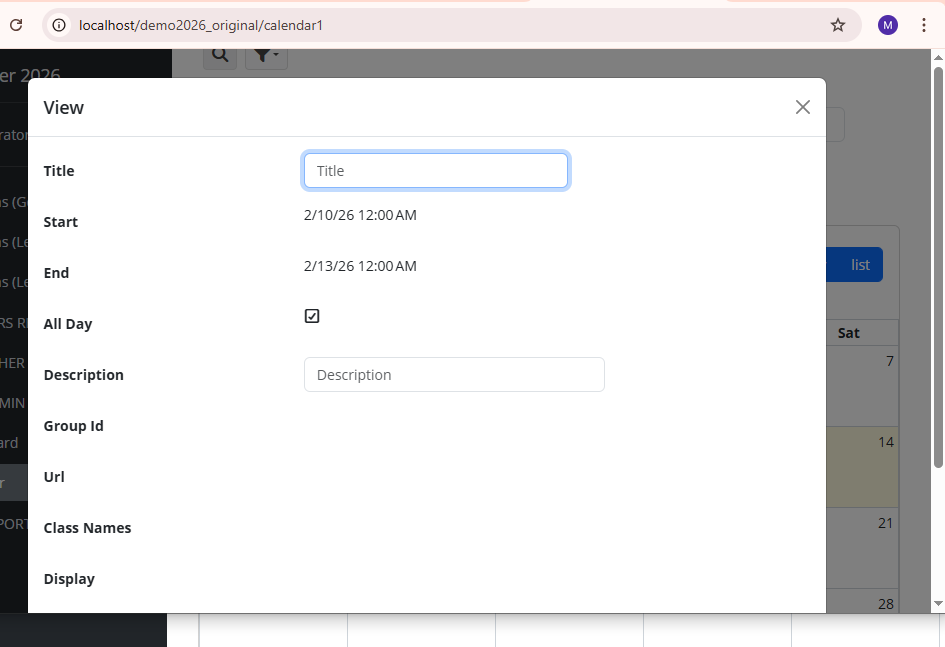
Go to the generated web application → Calendar Reports, right-click on one of the available events in the Calendar Reports, then here is the issue… you will see the Title and Description fields will use Textbox control, instead of using the simple read-only text: