Hi all:
I have a view in which I use a CustomAction to update a value.
This have been working for long time, but now something is happening.
The sql for the view is:
SELECT
  parte_trabajo.id_parte AS id_parte,
  Concat(usuarios.apellidos, ', ', usuarios.nombre) AS Operario,
  parte_trabajo.dni_operario AS dni_operario,
  parte_trabajo.fecha AS fecha,
  parte_trabajo.tipo_dia AS tipo_dia,
  parte_trabajo.proyecto AS proyecto,
  parte_trabajo.HNor AS HNor,
  parte_trabajo.HExt AS HExt,
  parte_trabajo.HDesp AS HDesp,
  parte_trabajo.HNoc AS HNoc,
  parte_trabajo.Dieta AS Dieta,
  parte_trabajo.conductor AS conductor,
  parte_trabajo.plus_conductor AS plus_conductor,
  parte_trabajo.plus_jefe_equipo AS plus_jefe_equipo,
  parte_trabajo.observaciones AS observaciones,
  parte_trabajo.VB_operario AS VB_operario,
  parte_trabajo.VB_JefeObra AS VB_JefeObra,
  proyectos.descripcion AS descripcion,
  proyectos.codigo_responsable AS codigo_responsable,
  usuarios.delegacion AS delegacion
FROM
  (parte_trabajo
  JOIN usuarios ON usuarios.DNI = parte_trabajo.dni_operario)
  JOIN proyectos ON proyectos.id_proyecto = parte_trabajo.proyecto
The code I’m using in List→PageLoad is:
function Page_Load(): void
{
    $this->CustomActions["VB"] = new ListAction(
        "VB",
        "Visto Bueno",
        IsLoggedIn(),
        ActionType::POSTBACK,
        ActionType::MULTIPLE,
        "¿Dar VB a los partes seleccionados?",
        "",
        "",
        fn($row) => $this->update(
            ["VB_JefeObra" => "SI"], // Update Starred field to 'Y'
            ["id_parte" => $row["id_parte"]]
          ) > 0, // Update the current record only (the second argument is WHERE clause for UPDATE statement)
        "Field modified successfully",
        "Failed to modify the field"
    );
}
When I regenerate the whole project, I get:
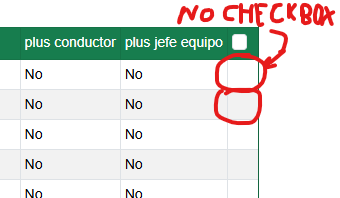
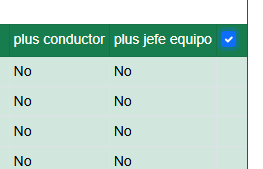
The page code shows:
                <td data-name="plus_conductor">
<span id="el1_partes_jdo_plus_conductor" class="el_partes_jdo_plus_conductor">
<span>
No</span>
</span>
</td>
                <td data-name="plus_jefe_equipo">
<span id="el1_partes_jdo_plus_jefe_equipo" class="el_partes_jdo_plus_jefe_equipo">
<span>
No</span>
</span>
</td>
    <td class="ew-multi-column-list-option-table w-1" data-name="checkbox"><span id="el1_partes_jdo_checkbox" class="partes_jdo_checkbox"></span></td>    </tr>
    <tr  class="ew-table-alt-row" data-rowindex="2" id="r2_partes_jdo" data-rowtype="1" data-inline="false">
            <td data-name="Operario">
<span id="el2_partes_jdo_Operario" class="el_partes_jdo_Operario">
Not sure if the problem have began:
- With the last update of phpmaker
- When I’ve edited the view to add to fields: parte_trabajo.plus_conductor AS plus_conductor,
parte_trabajo.plus_jefe_equipo AS plus_jefe_equipo….
I’ve noticed another problem, if I mark the “Edit” check in “Table” Tab, it dissappear and the edit pages are not created or the edit icon is checked. I just want to edit two fields from “parte_trabajo” table. The “update_table” is set to “parte_trabajo”.
Thanks in advance