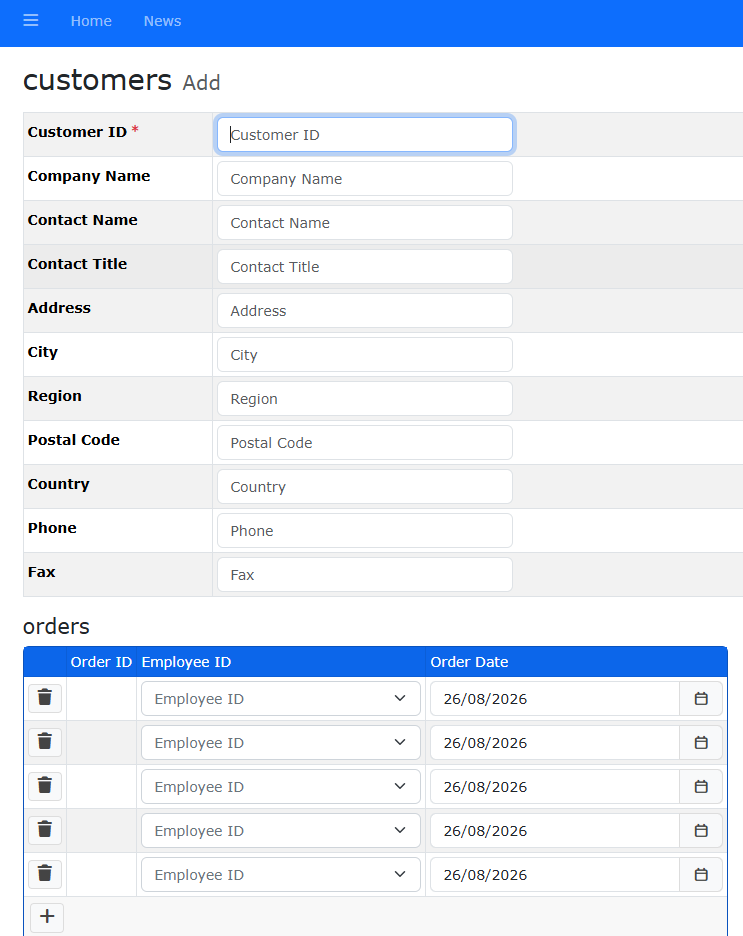
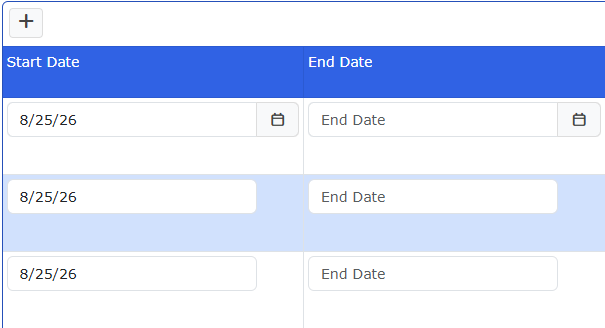
(v2026.3) We have master/detail tables with date/time pickers on the detail table. In v2026.3, the detail grid has multiple rows but only the first row shows the date/time picker buttons. In v2020, the buttons showed on every row. I couldn't find an example on the demo site with date/time pickers in a grid.
There are two errors in the console. I don't see any mention of the date/time picker in the errors:
TermContractsView2Ad…ntsView2&fk_ID=71:1 Loading the script 'http://localhost:8080/_vs/browserLink' violates the following Content Security Policy directive: "script-src 'self' blob: https://www.google-analytics.com https://\*.googleapis.com https://\*.gstatic.com \*.google.com https://\*.ggpht.com \*.googleusercontent.com https://js.pusher.com https://cdn.tiny.cloud https://\*.youtube.com 'nonce-C7DoAd5DCLxP8Z8T8K7DmAQ8QWp1J5eV6vfQeLM0p4w=' 'unsafe-eval' 'strict-dynamic'". Note that 'strict-dynamic' is present, so host-based allowlisting is disabled. Note that 'script-src-elem' was not explicitly set, so 'script-src' is used as a fallback. The action has been blocked.

TermContractsView2Ad…ntsView2&fk_ID=71:1 Loading the script 'http://localhost:8080/_framework/aspnetcore-browser-refresh.js' violates the following Content Security Policy directive: "script-src 'self' blob: https://www.google-analytics.com https://\*.googleapis.com https://\*.gstatic.com \*.google.com https://\*.ggpht.com \*.googleusercontent.com https://js.pusher.com https://cdn.tiny.cloud https://\*.youtube.com 'nonce-C7DoAd5DCLxP8Z8T8K7DmAQ8QWp1J5eV6vfQeLM0p4w=' 'unsafe-eval' 'strict-dynamic'". Note that 'strict-dynamic' is present, so host-based allowlisting is disabled. Note that 'script-src-elem' was not explicitly set, so 'script-src' is used as a fallback. The action has been blocked.