(v2025/2026)
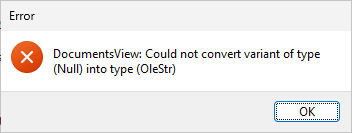
We have been trying to generate a project that uses Views (from the SQL database) and keep getting this error as soon as we press F9 to generate, before the progress dialog or generate scripts console appears. The message appears once for each View selected to generate but does not appear when only Tables are selected. We were originally importing a 2020 project into 2026. To test, we started a new project in 2026, connected to the database, set the project folder and pressed F9 to generate and got the error. We tried connecting to the database in ANM 2025 and still got the error, but it works in 2020 or 2022. We also tried a different database in 2026 and still get the error when a View is selected to generate. I manually deleted the project folder between each test so there would not be any leftover files. We have completed several projects in 2026 but I just noticed none of them have Views generated (some that work have views used as lookup tables but they are not checked to generate).
The demo site uses Database Views and works fine without any problem. So there may be something special about the database Views you are using.
Show the database schema for one of the problem Database View and the underlying tables, see if we can simulate.
I made a test database to see if I could re-create the issue.
For the table:
USE [AdminTools]
GO
/****** Object: Table [test].[TestTable] Script Date: 6/12/2026 7:48:03 PM ******/
SET ANSI_NULLS ON
GO
SET QUOTED_IDENTIFIER ON
GO
CREATE TABLE [test].[TestTable](
[ID] [int] IDENTITY(1,1) NOT NULL,
[Document] varchar NOT NULL,
CONSTRAINT [PK_TestTable] PRIMARY KEY CLUSTERED
(
[ID] ASC
)WITH (PAD_INDEX = OFF, STATISTICS_NORECOMPUTE = OFF, IGNORE_DUP_KEY = OFF, ALLOW_ROW_LOCKS = ON, ALLOW_PAGE_LOCKS = ON) ON [PRIMARY]
) ON [PRIMARY]
GO
For the view:
USE [AdminTools]
GO
/****** Object: View [test].[TestView] Script Date: 6/12/2026 7:50:22 PM ******/
SET ANSI_NULLS ON
GO
SET QUOTED_IDENTIFIER ON
GO
CREATE VIEW [test].[TestView]
AS
SELECT test.TestTable.*
FROM test.TestTable
GO
New project in ASPM 2026. Connect to database then generate, no other changes. Error dialog as soon as I generate.
If I click OK on the error, it tries to generate anyway, and once I worked through the compile errors I was able to complete the project anyway. So, something is wrong, but it's not bad enough to prevent generating a working project, I just have to click OK on the error each time I generate. As shown in the example database above, it can occur even with no nullable columns in the database, so I don't know where the (Null) is coming from. The database is in Microsoft SQL Server, in case that makes a difference.
The database schema that webworker posted above is a simple example that causes the error, at least on our server, which we set up according to Document.
Try download the latest version from the official web site, uninstall and install again. See if the error will go away. Make sure that there is no errors during installation. Also disable any AntiVirus / AntiSpam software that may have tamper with the installation process.
No change with the reinstall. We downloaded the latest version, disabled our Antivirus, and reinstalled. We also updated the versions of .net.
Cannot simulate. It is probably due to the database user does not have the permissions to retrieve the view definition. You may want to check.
If you are a registered user, you'd better send your project file/database to the support email for checking.
It is fixed in 2026.2. Thank you!