I’m trying to programmatically set a file field in the add form, getting the contents from a JS variable. I’ve had success with a TXT file, but cannot do it with a PNG image.
This works:
$("#myButton").click(function() {
    var fileString = "This is the contents of the test file.";
    const myFileContents = [fileString];
    const myFile = new File(myFileContents, "file01.txt", { type: "text/plain" });
    const dataTransfer = new DataTransfer();
    dataTransfer.items.add(myFile);
    $('#x_FILEFIELD')[0].files = dataTransfer.files;
    $('#x_FILEFIELD').trigger("change");
});
But, making the necessary changes for a PNG file, it doesn’t work:
$("#myButton").click(function() {
    var fileString = "iVBORw0KGgoAAAANSUhEUgAAAQAAAAEAAQMAAABmvDolAAAABlBMVEUAAAD///+l2Z/dAAAACXBIWXMAAA7EAAAOxAGVKw4bAAABcUlEQVRoge3VsW2FMBCA4SMUlGQDRkjKdKyVIhIeJaN4hIzgEVyiyLJj9BwHDp25hx9SinOBLN1XgPzLQDhYIECAAAECBAgQICCET3gqAg8AUwm4CIYqMHNAXwVsBN21wETQXgt0BM21QEUA14JljpJ6MIjNPgOMFSA2+3oE3nC194HY7DuuFoOPOhCbdUfA46zvAwYaj6vFINQBHYe42h1QVUDFT1So2h3QVWA5B42q3QFTAJ4BhgWMRWBrgFtmFmW9A3MBzAwwLY++CHDWa2AT6AogHAPc/RqYBFoaNAyAu18DnUBDg5YDFA1UAkCDjgM0DW7HhLrfgu4IpEUAn8F4Ejg+GE6CmQ/6k8Bm0F0FTAbtVUBn0JwGtwEJVAZAgZYHFAXgD0wE6Iog3z2aAUYC9DxgCOBWYCgCS4B8zXNAfwrkn9W8qfaRwPwegWOAtgg8DUIdsLl24iW/4SXtvvJuA4glQIAAAQIECBAg4N+CH3/WZDvRR7ZFAAAAAElFTkSuQmCC";
    const myFileContents = [atob(fileString)];
    const myFile = new File(myFileContents, "image.png", { type: "image/png" });
    const dataTransfer = new DataTransfer();
    dataTransfer.items.add(myFile);
    $('#x_FILEFIELD')[0].files = dataTransfer.files;
    $('#x_FILEFIELD').trigger("change");
});
fileString is a valid, base64 encoded PNG. What I get is:
- if FILEFIELD’s view tag is IMAGE, nothing happens, not even an error. I’m guessing I’m not triggering the correct event;
- if FILEFIELD’s view tag is FORMATED TEXT, i get this error:
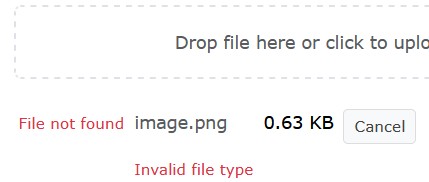
Both TXT and PNG are allowed file types. No temp file gets written server side.
Any ideas? Thanks in advance.