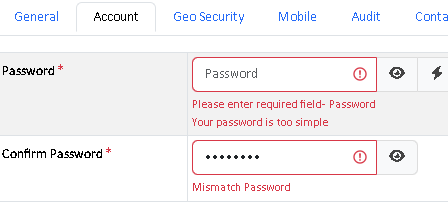
with JS validation, when there’s an error on a page (multi-page), and the user is on another page and submits from there… if an error occurs, the system doesn’t activate the tab with the error, so the user has to hunt the different tabs to see where the error is.
thanks, yes you’re right, i did some testing, for 2 other required fields “name” and email address fields for example, it jumped back.
it looks like the issue is on a tab that only contains the password field, it doesn’t select this tab/fields for some reason. it displays the error message, but doesn’t display the fields
You have “Confirm Password” field, so it is the registration page. The “Confirm Password” is virtual field (not existing in database) so there is no page number associated with it. Probably the JavaScript detected error in that field first so it cannot find the page to switch to. You may try add your page number by data attribute (e.g. data-page="1") to it by Startup Script.
did a test in the debugger and added the attribute data-page=“1” to id=“c_password” and went the the 2nd page and tried to register, in which it now moved to page 1 and set focus to the password fields…
in multipage custom template edit form i added data-page='1' to field as below code and i don't have any error in console ,but it don't switch to error page what is wrong ?
If Multi-Page (see Table Setup) is enabled for the page, the Custom Templates should include templates for all pages using {{{page_n}}} and {{{/page_n}}}, and each field must be placed in the same page as in the original script.