Updating project from v2024 to v2025 and any table that uses “Multiple Detail Tables” no longer shows the Master/Detail View/Edit/Copy buttons on the list page.
Make sure:
- The relationships between the master and detail table are still there.
- The detail tables are enabled with Master/Detail Add/Edit/View (as Detail).
- They are
- Detail tables still have this enabled
Another thing to note is it works fine on any master tables with only one detail table that don’t use “Multiple Detail Tables”.
Is it related to this information?
All detail tables have Add/Edit/View as Detail enabled.
I can access the Master/Detail Add page properly and doing so shows a problem with one of the detail tables. The “Equipment” detail table shows blank in Master/Detail Add in v2025 when in v2024 I can add rows to it normally. Not sure if this issue would cause the main issue of this thread or not.
The Master/Detail relations appear normal in the table setup for the “Equipment” table.
If you use User Level Security, make sure the user has “Add” permission to the detail table so Master/Detail-Add is allowed. Similarly for “Edit” permission.
I made a correction to the OP. I meant Master/Detail View/Edit/Copy don’t show. Master/Detail Add does show.
That aside the admin user does have all permissions for all tables and still has this problem.
If you are a registered user for v2025, you better send your project and required info to support for testing.
I am registered but cannot send the project for security purposes.
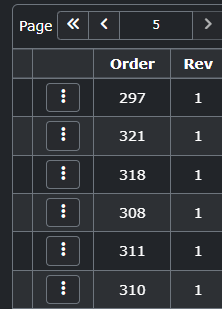
I can now confirm I can access the Master/Detail View page by typing in the URL manually but no UI buttons to go there show up.
You may actually create a similar simple project to reproduce the issue, and then send it to Support for checking.
It’s okay now I hunted down the problem.
In my code I had things like:
$this->ListOptions->Items[“view”]->Visible = false;
$this->ListOptions->Items[“edit”]->Visible = false;
to hide regular View and Edit buttons but keep the Master/Detail ones which works in v2024.
In v2025 these lines of code seem to hide both the regular buttons and the Master/Detail ones.
How can I hide regular View/Edit/Copy buttons but keep the Master/Detail ones in v2025? Unchecking the corresponding setting in the Table options doesn’t work because it removes both as well.
This is what I had in ListOptions_Load that worked in v2024
$this->ListOptions->Items[“view”]->Visible = false;
this is what the linked documentation says for v2025
$this->ListOptions[“view”]->Visible = false;
But both result in the same thing and cause both the regular option and the Master/Detail option to disappear.
Also tried to use ShowInButtonGroup and ShowInDropDown
$this->ListOptions->Items["view"]->ShowInDropDown = false;
$this->ListOptions->Items["view"]->ShowInButtonGroup  = false;
$this->ListOptions->Items["edit"]->ShowInDropDown = false;
$this->ListOptions->Items["edit"]->ShowInButtonGroup  = false;
But this results in the following. Yes they get hidden from the dropdown but this just makes them show up to the right.
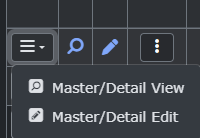
I cannot reproduce. Note that hiding “view” list option will not hide the “detail_xxx” list option (for “xxx” detail table) or the “details” list option (for multiple detail tables). After your code, you may use var_dump($this->ListOptions) to check if you have set up correctly.
Make sure you have not removed the View/Edit permissions in other server events.
So after investigating it more it seems there’s an issue with PHPMaker v2025s logic regarding hiding of the button dropdown.
If I only use
$this->ListOptions[“view”]->Visible = false;
to hide the view button or
$this->ListOptions[“edit”]->Visible = false;
to hide the edit button,
then everything works correctly. But if I hide both the view and edit buttons at the same time then the entire button dropdown vanishes.
This seems to be because v2025 button dropdown hiding logic isn’t taking into consideration that the Master/Detail versions of these buttons should still exist so it hides the entire dropdown thinking there are no possible actions on this table.
So it should be reproducible if you hide the regular versions of all buttons in this dropdown with that code. The result should be the Master/Detail versions of the buttons remain but instead the whole button dropdown disappears.
If “Preview” extension is enabled, the detail table links are already shown in the preview row, so they are not shown. If no other menu items to show (in your case you have only two and you hide them all), the dropdown has no visible items and is not required. If in your case you want to show the detail links anyway, you can use ListOptions_Load to unhide it, e.g. $this->ListOptions["detail_<MyDetailTable>"]->Visible = true;
1 Like
This was the solution. I disabled Preview extension for now as I decided it's not really needed.