returned: Do you want to run "router:match" instead? (y)
debug is enabled in the build, and convert to lowercase is enabled
the root htdocs is my current test 2025 project, added 2026 version as a directory underneath the root localhost and added RewriteBase /appname
to the htaccess file.
regenerated the htaccess, so there are no 2025 attributes in it.
no difference or change, continues to return no routes found..
i can see the base routes in the AppController.php, as well as the controllers for all the various forms, appears all vendor modules are loaded.
if this is correct, ran: php -d memory_limit=-1 bin/console router:match dashboard2
it returned: [ERROR] None of the routes match the path "dashboard2"
i tried some others, privacy, login, logout, 2fa etc same results
There is no need to use RewriteBase in .htaccess since v2024 (see URL Rewrite), you can remove it.
I provided a wrong command, it should be: php -d memory_limit=-1 bin/console debug:router
See Debugging → Console Commands and/or Symfony docs for more info.
Your command for matching the route should be: php -d memory_limit=-1 bin/console router:match /dashboard2
If the route exists, you’ll see detailed info of the route similar to: (example from demo project)
it looks like there are a bunch of routes when the command ran, i didn’t see the /dashboard2 route, which i can visually see the files for it in the various folders.
[edit] but it looks like in 2026 - it removed the “2” and is /dashboard (in 2025 it was created as dasboard2)
i can run register/resetpassword/login, etc.. they display but attempting to login:
on the login page:
Exception: Call to a member function setLanguage() on null File: C:\xampp\htdocs\documanage2026\src\LoginListener.php:189
i have 5 languages, and they appear to be loading when i switch between them
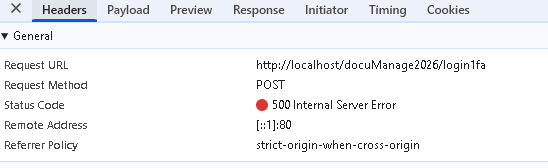
looking at the network debug:
Unable to find the controller for path “/login1fa”. The route is wrongly configured.
Note that most global variables are removed, see Migrating to v2026 → Deprecated and Removed:
Global variables are removed. If you still need to use the old global variables (e.g. $DECIMAL_SEPARATOR), you can use HttpContext('DECIMAL_SEPARATOR') instead.
Avoid global variables. Use properties available in the context. In your case, since userLoggingIn, userLoggedIn and userLoginError (methods for the corresponding server events) are generated in the LoginListener, you can reuse the properties of the class (see the generated source), e.g. you can simply use $this->language, $this->security now.
$gsFormError is out-dated and should be removed. If you want to return custom error message, you may throw CustomUserMessageAuthenticationException, e.g.
throw new CustomUserMessageAuthenticationException('Your error message');