Unable to open the program on Windows Server (v2026)

I have currently download the PHPMaker 2026 and install all the require program but unable to open the PHPMaker 2026 showing as “PHPMaker has stopped working”.

My system information are -

Operating System : Windows Server 2016 Standard

Processor : Inter(R) Xeon(R) CPU E31220 @ 3.10GHz

RAM : 14 GB

System Type : 64 bit

Note that PHPMaker is a 32-bit program, make sure you have installed correct version of .NET 8 Desktop Runtime (x86), see:

  1. System Requirements
  2. Heads-Up: System Requirements for the Upcoming Version (v2026)
  3. Migrating to v2026System Requirements

In short:

Previous versions of PHPMaker UI (not the generated PHP web application) runs on .NET Framework 4.x, v2026 uses .NET Desktop Runtime 8.0.x (x86) to leverage the latest performance improvements, security fixes, and long-term support features. Before installing v2026, make sure you install .NET Desktop Runtime 8.0.x (x86) first.

Note: There are different versions of .NET runtimes, you should install the .NET Desktop Runtime (or SDK, not the standard .NET Runtime or the ASP.NET Core Runtime). Also make sure you install the correct version, i.e. 8.0.x, installing older or newer versions will not work.

Yes, I have already installed the .NET Desktop Runtime

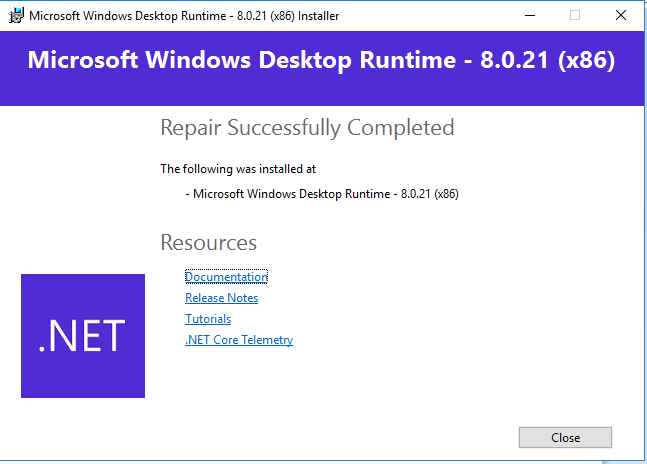
I again repair it

Still got the same error, Unable to open the PHPMaker 2026

You may check Windows Event Viewer → Windows Log → Application, see if you can find more info.

If you have antivirus software, try disable it first.

Also exclude PHPMaker.exe from Windows Defender:

  1. Open Windows SecurityVirus & threat protectionManage settings.
  2. Scroll to ExclusionsAdd or remove exclusionsAdd an exclusion → select File.
  3. Choose C:\Program Files (x86)\PHPMaker 2026\PHPMaker.exe to exclude.

Same here. I have all versions installed. Only 2026 does not start.

Faulting application name: PHPMaker.exe, version: 26.0.0.1, time stamp: 0x68ee6410
Faulting module name: KERNELBASE.dll, version: 10.0.26100.6899, time stamp: 0x56e9b7ab
Exception code: 0xe06d7363
Fault offset: 0x00164044
Faulting process id: 0x1D8
Faulting application start time: 0x1DC3F3252249B5E
Faulting application path: C:\Program Files (x86)\PHPMaker 2026\PHPMaker.exe
Faulting module path: C:\WINDOWS\System32\KERNELBASE.dll
Report Id: 9b65540f-8a22-4704-b757-723e696db49b
Faulting package full name:
Faulting package-relative application ID:

This is installed on my laptop:

Microsoft.AspNetCore.App 8.0.19 [C:\Program Files\dotnet\shared\Microsoft.AspNetCore.App]
Microsoft.NETCore.App 8.0.19 [C:\Program Files\dotnet\shared\Microsoft.NETCore.App]
Microsoft.WindowsDesktop.App 8.0.19 [C:\Program Files\dotnet\shared\Microsoft.WindowsDesktop.App]

The .NET runtimes you installed are x64 versions. Make sure you install x86 versions, installed files are under C:\Program Files (x86)\dotnet\shared.

I have the same problem with Windows Server 2022, version 2026 opens the application but quickly disappears to a red window. I tried following the steps mentioned above, but they didn’t work.

Make sure WindowsDesktop.App is installed:
C:\Program Files (x86)\dotnet\shared\Microsoft.WindowsDesktop.App\8.0.21

System
Provider: Application Error
EventID: 1000 (Qualifiers: 0)
Version: 0
Level: 2
Task: 100
Opcode: 0
Keywords: 0x80000000000000
TimeCreated: 2025-10-17T19:22:43.9377383Z
EventRecordID: 3404309
Correlation:
Execution: ProcessID=0, ThreadID=0
Channel: Application
Computer: xxx.xxx.xx
Security:

EventData:
PHPMaker.exe
26.0.0.2
68f0edd1
KERNELBASE.dll
10.0.20348.4294
20d41ce8
e06d7363
001395f2
34b4
01dc3f9b692a7ce6
C:\Program Files (x86)\PHPMaker 2026\PHPMaker.exe
C:\Windows\System32\KERNELBASE.dll
13f59072-4a08-4850-a39d-b4a128906e44

Application name with errors: PHPMaker.exe, version: 26.0.0.2, timestamp: 0x68f0edd1
Faulting module name: KERNELBASE.dll, version: 10.0.20348.4294, timestamp: 0x20d41ce8
Exception code: 0xe06d7363
Fault offset: 0x001395f2
Faulting process ID: 0x34b4
Faulting application start time: 0x01dc3f9b692a7ce6
Faulting application path: C:\Program Files (x86)\PHPMaker 2026\PHPMaker.exe
Faulting module path: C:\Windows\System32\KERNELBASE.dll
Report ID: 13f59072-4a08-4850-a39d-b4a128906e44
Full name of the package with errors:
Application ID associated with the package with errors:
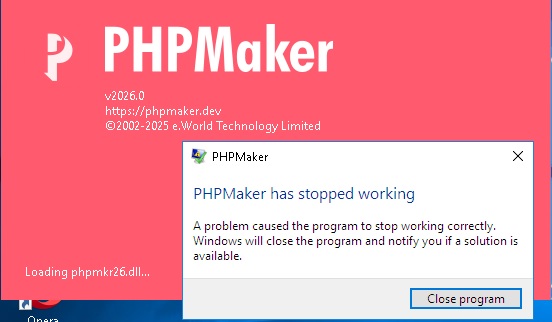
Phpmaker 2026 is not loading, just hangs and then closes.
reinstall windowsdesktop-runtime-8.0.21-win-x86.exe

Faulting application name: PHPMaker.exe, version: 26.0.0.3, time stamp: 0x68f72f8e
Faulting module name: KERNELBASE.dll, version: 10.0.26100.6899, time stamp: 0x56e9b7ab
Exception code: 0xe06d7363
Fault offset: 0x00164044
Faulting process id: 0x19D4
Faulting application start time: 0x1DC434EA658A2C6
Faulting application path: C:\Program Files (x86)\PHPMaker 2026\PHPMaker.exe
Faulting module path: C:\WINDOWS\System32\KERNELBASE.dll
Report Id: 8c328e3c-f8cb-4e9c-a682-775c988b24e5
Faulting package full name:
Faulting package-relative application ID:

anyone managed to get it running. i am on windows 11 enterprise

1 Like

Fixed. Please try v2026.1.