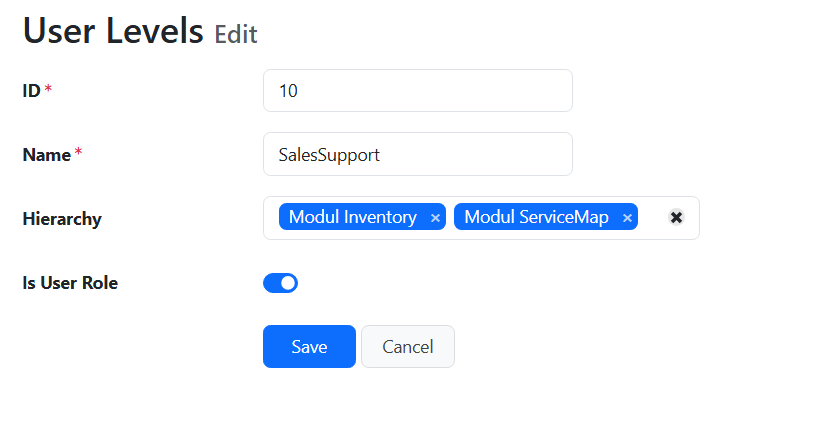
Then how did you test? You need to assign at least the List page permission for at least a table so that you can test by accessing the List page of the table with different user levels.
The sublevels have a lot of permissions, but the parent level none. There I use the hierarchy of sublevels.
I have several modules in m project, each module has its sublevel with permissions. And then there are business roles (aka userlevel) that have sublevels of this modules.
If you are talking about Hierarchical User Level, make sure you set the correct settings for Static/Dynamic User Levels. If you use Static User Levels, the hierarchy is set up in the UI under the Static User Levels → Hierarchy tab. If you use Dynamic User Levels, you need to set up the User Level Hierarchy Field and set up at the generated site as admin.
If the hierarchy setting is “5,9” (not “5.9”), then it is correct. However, from your screenshot, there is user levels with ID 5 and 9, did you remove them from the screenshot? If the user levels do not exist, the hierarchy cannot work.
Note also that the settings means user level 5 and 9 are sub user levels of user level 10, not vice versa. You need to login as user with user level 10 to have the table level permissions (e.g. List/View/Edit), (not record level, e.g. accessing other users’ record) of user level 5/9.
Yes, it’s 5,9 (screenshot was not clear), and yes 5 und 9 are two userlevel that exist and have permissions.
I give the id 10 to the user but he doesn’t see anything and gets 401 unauthorized error.
If i give on permission to the userlevel than he only sees that one, the permissions of the sublevel are completely ignored.
You may run Security()->showUserLevelInfo() in any page and check the info shown in the Debug bar. (Make sure you enable Debug first.) You’ll see info like:
I tried this feature, and same issue happened with me. The user didn’t inherent anything from the other user group(s). I also tried Security()->showUserLevelInfo() and nothing showed to the page to the user without permission. But it shows the user level for admin for example.
Same error for the user that inherit the permissions, unauthorized access!
I updated the template to the latest version 2025.12. Then I regenerate the code, still the user has no access to anything. When I logged in with the new user a 401-error page appear to me.
ah, found a bug. the lookup permissions must be at the top userlevel, the lookup permissions from the hierarchy are not used.
Lookup permissions only check the user’s direct user level instead of including hierarchical user level permissions. This means users with hierarchical access don’t get the correct lookup permissions.
Technical Analysis:
The issue is in the lookup permission checking code. The setHierarchy() method, which loads hierarchical user level permissions, is only called once in the constructor of AdvancedSecurity class. When lookups are performed, the system doesn’t reload these hierarchical permissions, so only direct user level permissions are considered.
Solution:
Add setHierarchy() calls before checking lookup permissions in:
ApiPermissionMiddleware.php (API lookups)
ApiController.php (API lookups)
Lookup.php (regular lookups)
This ensures hierarchical user level permissions are loaded before each lookup permission check.
Code Change:
// Load hierarchical user level permissions first
if ($security->isLoggedIn()) {
    $security->setHierarchy($security->currentUserLevelID());
}
$security->loadTablePermissions($tbl->TableVar);
Result:
Users now get correct lookup permissions that include both their direct and hierarchical user level permissions.
I’m using PHPMaker version 2025.12 with the latest template.
The user successfully inherits permissions from the parent level.
However, I’ve encountered a new issue.
When a user’s Hierarchy field is set to “Admin,” the user successfully gets all the Admin permissions. But if this user goes to the userpriv page to view permissions, the permission rows do not appear.
It seems the userpriv page is not checking the hierarchical permissions. It only checks the user’s direct user level, which does not have permission to view that page.
Is this a known bug or is there a specific setting I’m missing? Any help would be appreciated.