View only user level - view options menu not shown

Hi,

v2025.

have a userlevel that only allows list/view/search.

when testing, it appears the option menu -view option is not shown – this is the same case for every module. edit/add are hidden, but the view option should be shown, but is not.. check the perms and view is enabled.

anyone experiencing this?

  1. You did not tell how you set the permissions. Double check your View permission setting in the Static/Dynamic User Level settings. If you have server event to control the permissions, double check your code.
  2. If you use static settings, make sure you generate and upload the userlevelsettings.php again.
  3. You may also use showUserLevelInfo() to check the current user level permissions.

using dynamic security…

no console errors.

tried to display: $Security->showUserLevelInfo() in pageDataRendering()

C:\xampp\htdocs\src\AdvancedSecurity.php(1204): Call to a member function addMessage() on null

and regardless of adding the code to other functions - same error. strange could of sworn i did use this function weeks ago, don’t understand why its not working..

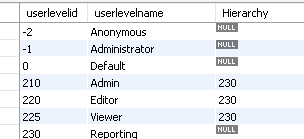
interesting…. we have 4 levels admin, editor, viewer, reports

admin 210, editor 220, viewer 225, reports 230

the only level that works is admin. (obviously..)

editor and viewer do not show the options menu at all.., and also does not inherit the reports level 230, so the reports menu does not display either

as for the userlevel, the other security items (add/delete etc) are correct and not displayed for the userlevel = viewer as expected.

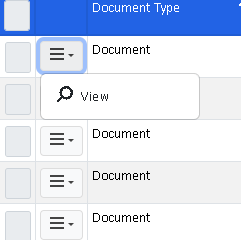
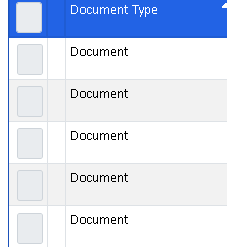
on one of the lists, you can see the options menu completely missing, where the “view” options should at least be available.

view option is selected on the 225/viewer user level

image

but now doesn’t explain the editor level option is also not displayed on the options menu.. which the level has been enabled on the various tables.

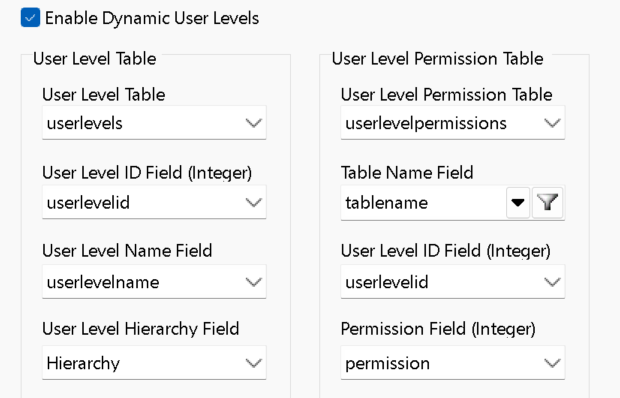
table userlevels:

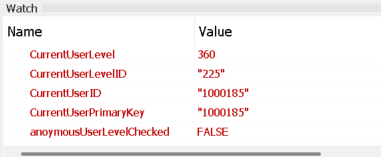
userlevelpermissions sample of userlevel viewer: 225 (permission = 360)

changed the level in the table to admin for the other users.. and all options were available.

as a test, added:

    $this->ListOptions->Items['edit']->Visible = true;                
    $this->ListOptions->Items['view']->Visible = true;                
to: listOptionsRendered()

and the options menu still does not appear

this is the first time logging in with an account that has userlevel other than “admin” account and noticed this..
  1. You need to turn on Debug so you can write the user level info.
  2. If there is no menu items or no permissions, the column and/or the button will not show at all. It seems that it is a display problem rather than permission problem, you may use var_dump($this->ListOptions) to check the list options and view HTML in your browser (e.g. right click the button and select Inspect) to check the output HTML.

thanks for this..

everything appears to be in order:

Debug:

showUserLevelInfo():

AdvancedSecurity::currentUserLevelID(): 225

infoAdvancedSecurity::userLevelList(): 225, 230

which is correct…

(won’t post the full level permissions dump unless needed), but going to suspect its correct at this point since current userlevel and userlevellist are correct

User with 225 level:

image

User with 220/admin level:

image

so you are correct, the div class is completely missing for some reason.

i can’t find any custom code/css that would cause this.

in setupListOptions()

    // "view"
    $item = &$this->ListOptions->add("view");
    $item->Visible = $this->security->canView();

    // "edit"
    $item = &$this->ListOptions->add("edit");
    $item->Visible = $this->security->canEdit();

return true..

would you know at which location it decides to display the button?

made some progress:

in renderListOptions, indeed it is wiping out the body content probably due to this->security->canView()

    // Render list options
    public function renderListOptions(): void
    {
        $this->ListOptions->loadDefault();

        // Call ListOptions_Rendering event
        $this->listOptionsRendering();
        $pageUrl = $this->pageUrl(false);
        if ($this->CurrentMode == "view") {
            // "view"
            $opt = $this->ListOptions["view"];
            $viewcaption = HtmlTitle($this->language->phrase("ViewLink"));
            if ($this->security->canView() && $this->showOptionLink("view")) {
                if ($this->ModalView && !IsMobile()) {
                    $opt->Body = "<a class=\"ew-row-link ew-view\" title=\"" . $viewcaption . "\" data-table=\"documents_library\" data-caption=\"" . $viewcaption . "\" data-ew-action=\"modal\" data-action=\"view\" data-ajax=\"" . ($this->UseAjaxActions ? "true" : "false") . "\" data-url=\"" . HtmlEncode(GetUrl($this->ViewUrl)) . "\" data-btn=\"null\">" . $this->language->phrase("ViewLink") . "</a>";
                } else {
                    $opt->Body = "<a class=\"ew-row-link ew-view\" title=\"" . $viewcaption . "\" data-caption=\"" . $viewcaption . "\" href=\"" . HtmlEncode(GetUrl($this->ViewUrl)) . "\">" . $this->language->phrase("ViewLink") . "</a>";
                }
            } else {
                $opt->Body = "";
            }

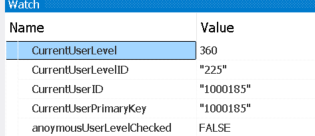
look at the variables:

this looks correct:

I removed: $this->showOptionLink(“view”), and the options menu now appears

not sure why this is..

looks like this is failing it:

// Show link optionally based on User ID
protected function showOptionLink(string $id = ""): bool
{
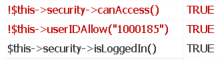
    if ($this->security->isLoggedIn() && !$this->security->canAccess() && !$this->userIDAllow($id)) { // No access permission
        return $this->security->isValidUserID($this->UserId->CurrentValue);
    }
    return true;
}

image

oh boy, looks like the permissions setup is getting a little convoluted and complex with all these flags, looks like that little “access” flag needed to be enabled.

would have been nice if phpM would have made a specific note that this needed to be enabled on existing userlevels in order for the security to continue to work.

No, “Access” flag means access to all records, you should not grant that unless you really allow user to access all records, see Permissions.

The code in showOptionLink() means if the user is not allowed to access all records, then it will check if the record is allowed by User ID Security. In your case it seems that it is not allowed by User ID Security. Note that the argument for userIDAllow() is not User ID, it is the page ID, i.e. "view", you should test $this->userIDAllow("view").

Double check your User ID Security setup. Did you enable User ID protection for that table? (You did, because showOptionLink() for User ID protection is generated.) If yes, is the User ID field correct? And the User ID field values are valid?